Buy reparieren.eu ?
We are moving the project
reparieren.eu .
Are you interested in purchasing the domain
reparieren.eu ?
domain@kv-gmbh.de · 0541-91531010
Buy reparieren.eu ?
How do I fix a USB overcurrent error?
To fix a USB overcurrent error, you can try the following steps: 1. Unplug all USB devices connected to your computer. 2. Shut down your computer and unplug it from the power source. 3. Wait for a few minutes to allow any residual power to dissipate. 4. Plug your computer back in and restart it. If the error persists, you may need to check the USB ports for any physical damage or debris that could be causing the overcurrent error. If the issue continues, it may be best to consult a professional technician for further assistance. **
Is it possible to repair a USB stick?
Yes, it is possible to repair a USB stick in some cases. If the issue is related to software or file system errors, it may be possible to repair the USB stick by using disk repair tools or formatting the drive. However, if the issue is related to physical damage, such as a broken connector or damaged circuitry, it may not be possible to repair the USB stick and it may need to be replaced. It's always a good idea to try different troubleshooting methods and seek professional help if needed before giving up on a malfunctioning USB stick. **


Similar search terms for USB
Top-Angebote
Products related to USB:
-
Drop Dash Deals Vehicle Maintenance Ramp For Car Service And Oil Changing Vehicle Maintenance Ramp For Car Service And Oil ChangingEffortlessly lift your vehicle with our 2Piece Vehicle Maintenance Ramp, designed for car service and oil changing. Built to support up to 8800 lbs, these durable ramps ensure a safe, stable lift, making them ideal for athome mechanics or...74,97 $*Shipping: 0,00 $Secure redirect to the provider
-
Smart Shopping Spot Portable Wireless USB Soldering Iron Kit Adjustable Temperature Mini Repair Tool Portable Wireless USB Soldering Iron Kit Adjustable Temperature Mini Repair ToolCompact, powerful, and designed for precision, the portable soldering iron makes every DIY repair effortless. Ideal for electronics enthusiasts, hobbyists, and professionals alike, this wireless tool lets you tackle projects anywherewithout being...89,97 $*Shipping: 0,00 $Secure redirect to the provider
-
All Categories Goods Fix It Sticks Maintenance Compact All In One Torque Driver Kit FISMUTK Fix It Sticks Maintenance Compact All In One Torque Driver Kit FISMUTKUnlock precision and convenience with the Fix It Sticks Maintenance Compact 19pc AllinOne Torque Driver Kit. Designed for professionals and hobbyists alike, this versatile kit provides the tools needed for field repairs and routine maintenance,...309,97 $*Shipping: 0,00 $Secure redirect to the provider
-
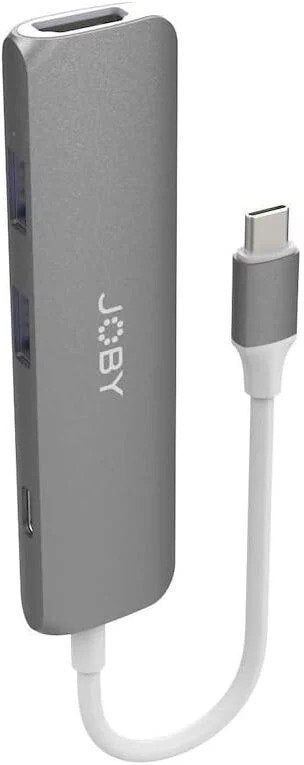
Joby USB C Hub with HDMI 4K, 2 USB-A 3.0 sockets, USB C PD, USB Multi-socket, USB Hub, NewExpand your device connectivity with the JOBY USB-C Hub with HDMI 4K, 2 USB-A 3.0 Sockets & USB-C Power Delivery, a compact and versatile multi-port adapter designed for laptops, tablets, and USB-C devices. Perfect for professionals, students, and content creators, this hub allows you to connect multiple peripherals and external displays while keeping your device powered. Built with a durable aluminium housing and sleek design, the hub offers reliable performance and portability for everyday work, travel, or home setups. It enables you to mirror or extend your laptop display to a monitor or TV in up to 4K resolution, while also connecting USB devices such as keyboards, flash drives, or external storage. ✔️ 4K HDMI Output – Mirror or extend your display to a monitor or TV up to 3840 × 2160 @ 30Hz ✔️ 2 × USB-A 3.0 Ports – High-speed data transfer up to 5Gbps for peripherals and storage devices ✔️ USB-C Power Delivery Port – Supports pass-through charging while using the hub ✔️ Compact Aluminium Design – Durable, lightweight housing ideal for travel and daily use ✔️ Plug-and-Play Connectivity – No drivers required, easy setup with USB-C laptops and tablets ✔️ Wide Compatibility – Works with MacBook, iPad Pro, and USB-C laptops ✔️ Multi-Device Connectivity – Connect keyboards, mice, USB drives, and external displays simultaneously ✔️ Portable & Lightweight – Small form factor perfect for mobile workstations The JOBY USB-C Hub 4-in-1 is an ideal solution for users who need extra connectivity from a single USB-C port. Whether you're presenting on a larger screen, transferring files, or connecting accessories, this hub provides reliable performance and convenience in one compact device17,99 £*Shipping: 0,00 £Secure redirect to the provider


-
How can I repair a broken micro-USB port?
Repairing a broken micro-USB port can be challenging, but it is possible with the right tools and skills. First, you will need to disassemble the device to access the port. Then, you can try to re-solder any loose connections or replace the port entirely if it is damaged beyond repair. It is recommended to seek help from a professional technician if you are not experienced in soldering or electronics repair to avoid causing further damage to the device. **
-
Is it possible to repair a broken USB stick?
Yes, it is possible to repair a broken USB stick in some cases. If the issue is related to a software problem, you may be able to use data recovery software to retrieve the files from the USB stick. However, if the issue is hardware-related, such as a broken connector or damaged circuitry, it may be more difficult to repair and may require professional assistance. In some cases, it may be more cost-effective to simply replace the USB stick. **
-
Where can I find a repair service for JBL Bluetooth speakers that also repairs Micro-USB connectors?
You can find a repair service for JBL Bluetooth speakers that also repairs Micro-USB connectors at electronic repair shops or authorized JBL service centers. You can search online for electronic repair shops in your area that specialize in repairing audio equipment and offer Micro-USB connector repairs. Additionally, you can contact JBL customer support to inquire about authorized service centers that can provide the necessary repairs for your JBL Bluetooth speaker and Micro-USB connector. **
-
How can one repair a USB stick without formatting it?
One way to repair a USB stick without formatting it is to try using the built-in Windows tool called Disk Check. This tool can scan and fix errors on the USB stick without erasing the data. Another option is to use third-party data recovery software to try and recover the files on the USB stick before attempting any repairs. Additionally, you can try using the Command Prompt to run diskpart commands to repair the USB stick without formatting it. **


How can I repair the USB driver after uninstalling it?
To repair the USB driver after uninstalling it, you can try reinstalling the driver by connecting the USB device to your computer and letting the system automatically search for and install the driver. If that doesn't work, you can manually download the latest driver from the manufacturer's website and install it on your computer. Another option is to use the Device Manager in Windows to scan for hardware changes, which may prompt the system to reinstall the driver. **
How can I repair the USB plug of my headset?
To repair the USB plug of your headset, you can start by checking if the issue is with the plug itself or the cable. If it's the plug, you can try gently straightening any bent pins with a small tool. If there are visible signs of damage, you may need to replace the plug entirely. You can purchase a replacement USB plug and solder it onto the headset cable, or seek the help of a professional if you're not comfortable with soldering. Additionally, you can also consider using a USB adapter or extension cable to bypass the damaged plug altogether. **
Top-Angebote
Products related to USB:
-
Uplift Essentials Oil Change Maintenance Service Reminder Stickers Oil Change Maintenance Service Reminder StickersNever miss a crucial vehicle checkup, filter replacement, or mileage milestone again with these professional oil change reminder stickers. Designed specifically for clear windshield application, these lowtack static cling labels allow mechanics,...37,97 $*Shipping: 0,00 $Secure redirect to the provider
-
Inspire Daily Merch Car Headlight Restoration Polish Liquid Polymer Auto Headlight Renovation Repair Kit carton KitRestore Your Car Headlights Like New The Car Headlight Restoration Polish Kit 800ML is your perfect solution. This easytouse liquid polymer formula is specifically designed to restore your car headlights to their original condition, removing haze,...169,97 $*Shipping: 0,00 $Secure redirect to the provider
-
Drop Dash Deals Vehicle Maintenance Ramp For Car Service And Oil Changing Vehicle Maintenance Ramp For Car Service And Oil ChangingEffortlessly lift your vehicle with our 2Piece Vehicle Maintenance Ramp, designed for car service and oil changing. Built to support up to 8800 lbs, these durable ramps ensure a safe, stable lift, making them ideal for athome mechanics or...74,97 $*Shipping: 0,00 $Secure redirect to the provider
-
Smart Shopping Spot Portable Wireless USB Soldering Iron Kit Adjustable Temperature Mini Repair Tool Portable Wireless USB Soldering Iron Kit Adjustable Temperature Mini Repair ToolCompact, powerful, and designed for precision, the portable soldering iron makes every DIY repair effortless. Ideal for electronics enthusiasts, hobbyists, and professionals alike, this wireless tool lets you tackle projects anywherewithout being...89,97 $*Shipping: 0,00 $Secure redirect to the provider
-
How do I fix a USB overcurrent error?
To fix a USB overcurrent error, you can try the following steps: 1. Unplug all USB devices connected to your computer. 2. Shut down your computer and unplug it from the power source. 3. Wait for a few minutes to allow any residual power to dissipate. 4. Plug your computer back in and restart it. If the error persists, you may need to check the USB ports for any physical damage or debris that could be causing the overcurrent error. If the issue continues, it may be best to consult a professional technician for further assistance. **
-
Is it possible to repair a USB stick?
Yes, it is possible to repair a USB stick in some cases. If the issue is related to software or file system errors, it may be possible to repair the USB stick by using disk repair tools or formatting the drive. However, if the issue is related to physical damage, such as a broken connector or damaged circuitry, it may not be possible to repair the USB stick and it may need to be replaced. It's always a good idea to try different troubleshooting methods and seek professional help if needed before giving up on a malfunctioning USB stick. **
-
How can I repair a broken micro-USB port?
Repairing a broken micro-USB port can be challenging, but it is possible with the right tools and skills. First, you will need to disassemble the device to access the port. Then, you can try to re-solder any loose connections or replace the port entirely if it is damaged beyond repair. It is recommended to seek help from a professional technician if you are not experienced in soldering or electronics repair to avoid causing further damage to the device. **
-
Is it possible to repair a broken USB stick?
Yes, it is possible to repair a broken USB stick in some cases. If the issue is related to a software problem, you may be able to use data recovery software to retrieve the files from the USB stick. However, if the issue is hardware-related, such as a broken connector or damaged circuitry, it may be more difficult to repair and may require professional assistance. In some cases, it may be more cost-effective to simply replace the USB stick. **
Similar search terms for USB
-
All Categories Goods Fix It Sticks Maintenance Compact All In One Torque Driver Kit FISMUTK Fix It Sticks Maintenance Compact All In One Torque Driver Kit FISMUTKUnlock precision and convenience with the Fix It Sticks Maintenance Compact 19pc AllinOne Torque Driver Kit. Designed for professionals and hobbyists alike, this versatile kit provides the tools needed for field repairs and routine maintenance,...309,97 $*Shipping: 0,00 $Secure redirect to the provider
-
Joby USB C Hub with HDMI 4K, 2 USB-A 3.0 sockets, USB C PD, USB Multi-socket, USB Hub, NewExpand your device connectivity with the JOBY USB-C Hub with HDMI 4K, 2 USB-A 3.0 Sockets & USB-C Power Delivery, a compact and versatile multi-port adapter designed for laptops, tablets, and USB-C devices. Perfect for professionals, students, and content creators, this hub allows you to connect multiple peripherals and external displays while keeping your device powered. Built with a durable aluminium housing and sleek design, the hub offers reliable performance and portability for everyday work, travel, or home setups. It enables you to mirror or extend your laptop display to a monitor or TV in up to 4K resolution, while also connecting USB devices such as keyboards, flash drives, or external storage. ✔️ 4K HDMI Output – Mirror or extend your display to a monitor or TV up to 3840 × 2160 @ 30Hz ✔️ 2 × USB-A 3.0 Ports – High-speed data transfer up to 5Gbps for peripherals and storage devices ✔️ USB-C Power Delivery Port – Supports pass-through charging while using the hub ✔️ Compact Aluminium Design – Durable, lightweight housing ideal for travel and daily use ✔️ Plug-and-Play Connectivity – No drivers required, easy setup with USB-C laptops and tablets ✔️ Wide Compatibility – Works with MacBook, iPad Pro, and USB-C laptops ✔️ Multi-Device Connectivity – Connect keyboards, mice, USB drives, and external displays simultaneously ✔️ Portable & Lightweight – Small form factor perfect for mobile workstations The JOBY USB-C Hub 4-in-1 is an ideal solution for users who need extra connectivity from a single USB-C port. Whether you're presenting on a larger screen, transferring files, or connecting accessories, this hub provides reliable performance and convenience in one compact device17,99 £*Shipping: 0,00 £Secure redirect to the provider
-
Drop Dash Deals Sunshade Repair Kit For Sunroof Shade Fix Sunshade Repair Kit For Sunroof Shade FixBring your Mercedes cabin back to the clean, comfortable feel it was meant to have with this 1 pc of kit Mercedes sunshade repair kit. Made for EClass owners dealing with a sagging, stuck, or broken shade, it offers a practical fix without the cost...53,97 $*Shipping: 0,00 $Secure redirect to the provider
-
Uplift Essentials Electric Knife Sharpener & Polisher Professional USB Rechargeable Honing Tool High Precision Kitchen Blade Maintenance orangeAchieve culinary optimization with this Electric Knife Sharpener. Specifically engineered for edge transparency, this highperformance maintenance device acts as a vital tool for cutting efficiency, neutralizing dullness and blade fatigue with...69,97 $*Shipping: 0,00 $Secure redirect to the provider
-
Where can I find a repair service for JBL Bluetooth speakers that also repairs Micro-USB connectors?
You can find a repair service for JBL Bluetooth speakers that also repairs Micro-USB connectors at electronic repair shops or authorized JBL service centers. You can search online for electronic repair shops in your area that specialize in repairing audio equipment and offer Micro-USB connector repairs. Additionally, you can contact JBL customer support to inquire about authorized service centers that can provide the necessary repairs for your JBL Bluetooth speaker and Micro-USB connector. **
-
How can one repair a USB stick without formatting it?
One way to repair a USB stick without formatting it is to try using the built-in Windows tool called Disk Check. This tool can scan and fix errors on the USB stick without erasing the data. Another option is to use third-party data recovery software to try and recover the files on the USB stick before attempting any repairs. Additionally, you can try using the Command Prompt to run diskpart commands to repair the USB stick without formatting it. **
-
How can I repair the USB driver after uninstalling it?
To repair the USB driver after uninstalling it, you can try reinstalling the driver by connecting the USB device to your computer and letting the system automatically search for and install the driver. If that doesn't work, you can manually download the latest driver from the manufacturer's website and install it on your computer. Another option is to use the Device Manager in Windows to scan for hardware changes, which may prompt the system to reinstall the driver. **
-
How can I repair the USB plug of my headset?
To repair the USB plug of your headset, you can start by checking if the issue is with the plug itself or the cable. If it's the plug, you can try gently straightening any bent pins with a small tool. If there are visible signs of damage, you may need to replace the plug entirely. You can purchase a replacement USB plug and solder it onto the headset cable, or seek the help of a professional if you're not comfortable with soldering. Additionally, you can also consider using a USB adapter or extension cable to bypass the damaged plug altogether. **
* All prices are inclusive of VAT and, if applicable, plus shipping costs. The offer information is based on the details provided by the respective shop and is updated through automated processes. Real-time updates do not occur, so deviations can occur in individual cases. ** Note: Parts of this content were created by AI.