Buy reparieren.eu ?
We are moving the project
reparieren.eu .
Are you interested in purchasing the domain
reparieren.eu ?
domain@kv-gmbh.de · 0541-91531010
Buy reparieren.eu ?
How can one repair a controller?
To repair a controller, one can start by identifying the specific issue with the controller, such as a malfunctioning button or joystick. Once the issue is identified, the controller can be disassembled using the appropriate tools. The problematic component can then be repaired or replaced, and the controller can be reassembled. It's important to follow a repair guide or tutorial to ensure the proper steps are taken and to avoid causing further damage to the controller. If the issue is more complex, it may be best to seek professional repair services. **
How can one repair an Xbox controller?
To repair an Xbox controller, start by checking the batteries and ensuring they are properly inserted. If the controller is still not working, try resetting it by pressing the small reset button on the back of the controller. If the issue persists, you may need to open the controller and check for any loose connections or damaged components. You can also try cleaning the buttons and analog sticks with compressed air to remove any debris that may be causing them to stick or not function properly. If these steps do not resolve the issue, it may be necessary to replace the faulty components or seek professional repair services. **


Similar search terms for Controller
Top-Angebote
Products related to Controller:
-
Multicon Wholesale Hub Green Analog Sensor Switch For Xbox Controller Xbox Repair Kit Green Analog Sensor Switch For Xbox Controller Xbox Repair KitRevive your Xbox 360 controller with ease using the 20PCS Green 3D Analog Sensor Switch. Designed for gamers who need a quick, affordable solution to restore controller functionality, this set of highquality Xbox 360 controller repair parts is...79,97 $*Shipping: 0,00 $Secure redirect to the provider
-
All Categories Goods Universal PSI Manual Boost Controller Kit Adjustable Anodized Turbo Boost Controller Universal PSI Manual Boost Controller Kit Adjustable Anodized Turbo Boost ControllerFeel the difference when your turbo setup responds with more control and confidence. This manual boost controller is built for drivers and tuners who want a simple, reliable way to finetune boost pressure without overpaying for complex electronics....59,97 $*Shipping: 0,00 $Secure redirect to the provider
-
CaseAndConnect EasySMX Controller Carrying Case Shockproof Game Controller Storage Case For PS5 Xbox Switch EasySMX Controller Carrying Case Shockproof Game Controller Storage Case For PS5 Xbox SwitchProtect your controller wherever gaming takes you. This compact gaming controller travel case keeps compatible EasySMX, PS4, PS5, Xbox, Switch, and Switch Pro controllers protected during storage and travel. Its durable, abrasionresistant exterior...39,97 $*Shipping: 0,00 $Secure redirect to the provider
-
PRiME Left + Right Slide Rail Flex Cable For Nintendo Switch Joy Con Controller Repair Replacement Left + Right Slide Rail Flex Cable For Nintendo Switch Joy Con Controller Repair ReplacementRestore full functionality to your Nintendo Switch with this highquality Left Right Slide Rail wSensor Flex Cable for Nintendo Switch Console Slider Bar. Whether you're experiencing connectivity issues, JoyCon detachment, or broken rails, this...29,97 $*Shipping: 0,00 $Secure redirect to the provider


-
How can I repair a PS4 controller?
To repair a PS4 controller, you can try the following steps: 1. Clean the controller by using compressed air to remove any dust or debris that may be causing issues with the buttons or joysticks. 2. Check the battery to ensure it is fully charged or replace it if necessary. 3. If the controller is not connecting to the console, try resetting the controller by pressing the small reset button on the back with a paperclip. 4. If these steps do not work, you may need to open up the controller and check for any loose connections or damaged components that may need to be replaced. **
-
How do I repair the brewing controller?
To repair a brewing controller, you should first identify the specific issue with the controller. This could involve checking for loose connections, damaged wires, or malfunctioning components. Once you have identified the problem, you can attempt to repair or replace the faulty parts. It is important to follow the manufacturer's instructions or consult a professional if you are unsure about how to proceed with the repair. **
-
How can one repair a controller cable?
To repair a controller cable, you can start by identifying the location of the damage. Once you have located the damaged area, you can use electrical tape or heat shrink tubing to cover and secure the exposed wires. If the damage is severe, you may need to cut out the damaged section and splice the wires back together using a soldering iron and heat shrink tubing. It's important to ensure that the repaired area is well insulated and secure to prevent future damage. **
-
How can one repair a defective PS3 controller?
To repair a defective PS3 controller, you can try the following steps: 1. Reset the controller by inserting a small pin or paperclip into the reset button on the back of the controller. 2. Clean the controller by gently wiping the buttons and analog sticks with a slightly damp cloth. 3. Check the battery and make sure it is fully charged or replace it if necessary. 4. If these steps do not work, you may need to open up the controller and check for any loose connections or damaged components that may need to be repaired or replaced. **

How can one repair the Switch Pro Controller?
To repair the Switch Pro Controller, you can start by checking for any physical damage such as cracks or loose parts. If there are any visible issues, you can try to fix them by reattaching or replacing the damaged parts. If the problem is not physical, you can try resetting the controller by pressing the small reset button on the back with a paperclip. If the issue persists, you may need to contact Nintendo for further assistance or consider taking the controller to a professional repair service. **
How can one fix stick drift on a PS4 controller?
To fix stick drift on a PS4 controller, you can try cleaning around the analog stick with compressed air or isopropyl alcohol to remove any debris causing the issue. If cleaning doesn't work, you may need to replace the analog stick module or the entire controller. There are tutorials available online that provide step-by-step instructions on how to disassemble the controller and replace the faulty components. **
Top-Angebote
Products related to Controller:
-
PRiME Repair Tool Kit For Xbox One Controller, 3D Analog Joysticks & Thumbsticks Caps For PS4, Nintendo Game Controller Repair Tool Kit For Xbox One Controller, 3D Analog Joysticks & Thumbsticks Caps For PS4, Nintendo Game ControllerRestore precision control with this allinone Repair Tool Kit for Xbox One Controller. Designed to resolve common controller issues like stick drift, dead zones, and broken thumbsticks, this kit includes 3D Analog Joysticks and Thumbsticks Caps...29,97 $*Shipping: 0,00 $Secure redirect to the provider
-
All Categories Goods Generator Controller For Gasoline Genset, Genset Controller MK2 Generator Controller For Gasoline Genset, Genset Controller MK2Enhance Generator Efficiency with the DC20D MK2 Genset Controller The DC20D MK2 Genset Controller is a powerful, reliable solution designed to enhance the performance of your gasolinepowered generators. With precision control and robust features,...149,97 $*Shipping: 0,00 $Secure redirect to the provider
-
Multicon Wholesale Hub Green Analog Sensor Switch For Xbox Controller Xbox Repair Kit Green Analog Sensor Switch For Xbox Controller Xbox Repair KitRevive your Xbox 360 controller with ease using the 20PCS Green 3D Analog Sensor Switch. Designed for gamers who need a quick, affordable solution to restore controller functionality, this set of highquality Xbox 360 controller repair parts is...79,97 $*Shipping: 0,00 $Secure redirect to the provider
-
All Categories Goods Universal PSI Manual Boost Controller Kit Adjustable Anodized Turbo Boost Controller Universal PSI Manual Boost Controller Kit Adjustable Anodized Turbo Boost ControllerFeel the difference when your turbo setup responds with more control and confidence. This manual boost controller is built for drivers and tuners who want a simple, reliable way to finetune boost pressure without overpaying for complex electronics....59,97 $*Shipping: 0,00 $Secure redirect to the provider
-
How can one repair a controller?
To repair a controller, one can start by identifying the specific issue with the controller, such as a malfunctioning button or joystick. Once the issue is identified, the controller can be disassembled using the appropriate tools. The problematic component can then be repaired or replaced, and the controller can be reassembled. It's important to follow a repair guide or tutorial to ensure the proper steps are taken and to avoid causing further damage to the controller. If the issue is more complex, it may be best to seek professional repair services. **
-
How can one repair an Xbox controller?
To repair an Xbox controller, start by checking the batteries and ensuring they are properly inserted. If the controller is still not working, try resetting it by pressing the small reset button on the back of the controller. If the issue persists, you may need to open the controller and check for any loose connections or damaged components. You can also try cleaning the buttons and analog sticks with compressed air to remove any debris that may be causing them to stick or not function properly. If these steps do not resolve the issue, it may be necessary to replace the faulty components or seek professional repair services. **
-
How can I repair a PS4 controller?
To repair a PS4 controller, you can try the following steps: 1. Clean the controller by using compressed air to remove any dust or debris that may be causing issues with the buttons or joysticks. 2. Check the battery to ensure it is fully charged or replace it if necessary. 3. If the controller is not connecting to the console, try resetting the controller by pressing the small reset button on the back with a paperclip. 4. If these steps do not work, you may need to open up the controller and check for any loose connections or damaged components that may need to be replaced. **
-
How do I repair the brewing controller?
To repair a brewing controller, you should first identify the specific issue with the controller. This could involve checking for loose connections, damaged wires, or malfunctioning components. Once you have identified the problem, you can attempt to repair or replace the faulty parts. It is important to follow the manufacturer's instructions or consult a professional if you are unsure about how to proceed with the repair. **
Similar search terms for Controller
-
CaseAndConnect EasySMX Controller Carrying Case Shockproof Game Controller Storage Case For PS5 Xbox Switch EasySMX Controller Carrying Case Shockproof Game Controller Storage Case For PS5 Xbox SwitchProtect your controller wherever gaming takes you. This compact gaming controller travel case keeps compatible EasySMX, PS4, PS5, Xbox, Switch, and Switch Pro controllers protected during storage and travel. Its durable, abrasionresistant exterior...39,97 $*Shipping: 0,00 $Secure redirect to the provider
-
PRiME Left + Right Slide Rail Flex Cable For Nintendo Switch Joy Con Controller Repair Replacement Left + Right Slide Rail Flex Cable For Nintendo Switch Joy Con Controller Repair ReplacementRestore full functionality to your Nintendo Switch with this highquality Left Right Slide Rail wSensor Flex Cable for Nintendo Switch Console Slider Bar. Whether you're experiencing connectivity issues, JoyCon detachment, or broken rails, this...29,97 $*Shipping: 0,00 $Secure redirect to the provider
-
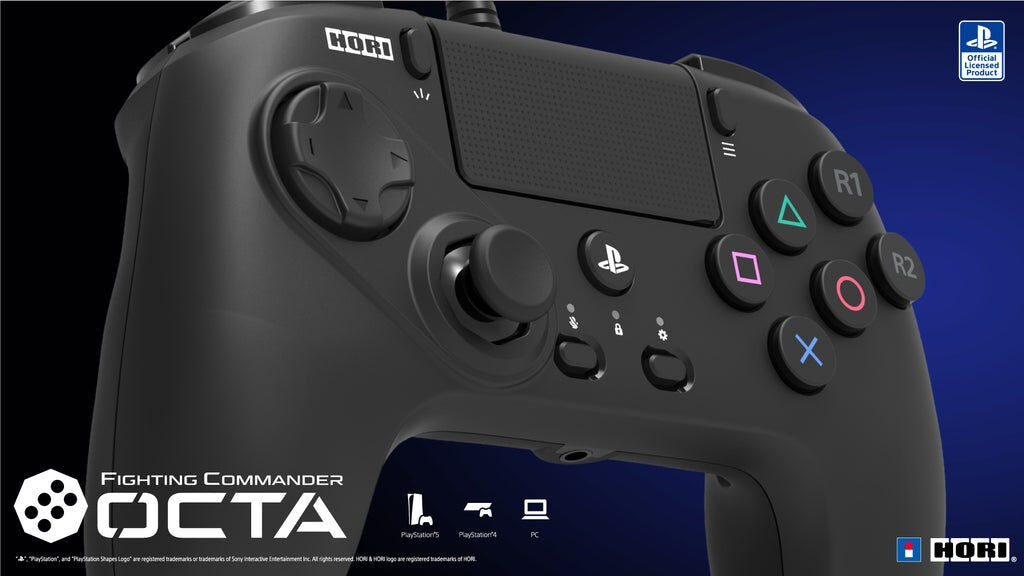
HORI Fighting Commander OCTA - PlayStation 5 Controller - Wired Fighting Game Controller - BlackTake control of fighting games with the HORI Fighting Commander OCTA, a dedicated wired controller designed for PlayStation 5. Its fighting-game-focused layout provides a practical alternative to a standard console gamepad for players who prefer a traditional fight-pad style. The Fighting Commander OCTA is a PlayStation 5 accessory for compatible games and systems. It features a dedicated arcade-style controller design and a wired game controller connection. Made by HORI, this controller is manufactured in China. It is supplied as an individual retail controller rather than a trade carton or display unit. The Fighting Commander OCTA is compatible with PlayStation 5.45,99 £*Shipping: 3,95 £Secure redirect to the provider
-
Uplift Picks PS5 Controller Stand Game Controller Holder Desktop Display Rack cKeep your gaming space clean and stylish with this sleek PS5 controller stand designed for both function and display. This sturdy game controller holder gives your controller a dedicated place, reducing clutter and protecting it from scratches. Its...90,00 $*Shipping: 0,00 $Secure redirect to the provider
-
How can one repair a controller cable?
To repair a controller cable, you can start by identifying the location of the damage. Once you have located the damaged area, you can use electrical tape or heat shrink tubing to cover and secure the exposed wires. If the damage is severe, you may need to cut out the damaged section and splice the wires back together using a soldering iron and heat shrink tubing. It's important to ensure that the repaired area is well insulated and secure to prevent future damage. **
-
How can one repair a defective PS3 controller?
To repair a defective PS3 controller, you can try the following steps: 1. Reset the controller by inserting a small pin or paperclip into the reset button on the back of the controller. 2. Clean the controller by gently wiping the buttons and analog sticks with a slightly damp cloth. 3. Check the battery and make sure it is fully charged or replace it if necessary. 4. If these steps do not work, you may need to open up the controller and check for any loose connections or damaged components that may need to be repaired or replaced. **
-
How can one repair the Switch Pro Controller?
To repair the Switch Pro Controller, you can start by checking for any physical damage such as cracks or loose parts. If there are any visible issues, you can try to fix them by reattaching or replacing the damaged parts. If the problem is not physical, you can try resetting the controller by pressing the small reset button on the back with a paperclip. If the issue persists, you may need to contact Nintendo for further assistance or consider taking the controller to a professional repair service. **
-
How can one fix stick drift on a PS4 controller?
To fix stick drift on a PS4 controller, you can try cleaning around the analog stick with compressed air or isopropyl alcohol to remove any debris causing the issue. If cleaning doesn't work, you may need to replace the analog stick module or the entire controller. There are tutorials available online that provide step-by-step instructions on how to disassemble the controller and replace the faulty components. **
* All prices are inclusive of VAT and, if applicable, plus shipping costs. The offer information is based on the details provided by the respective shop and is updated through automated processes. Real-time updates do not occur, so deviations can occur in individual cases. ** Note: Parts of this content were created by AI.